SENSE FAQ
WaterGuru is a smart device that’s installed on your skimmer with its Sensor dangling in the skimmer basket. WaterGuru uses patented optical technology to measure the Free Chlorine (FC) and acidity (pH) of your pool water. You can monitor your pool conditions through the SENSE app.
WaterGuru measures the free chlorine (FC), acidity (pH), temperature, and flow of your pool water.
- SENSE is made to be accurate and self calibrating.
- During each reading the SENSE is calibrated to account for the unique environment of your skimmer at the time of measurement.
- The water exposure of the proprietary chemistry pads is more than 10 minutes to stabilize the color change in each pad.
- This ensures most accurate and consistent measurements.
- When a Measure Now is requested from outside the Bluetooth range of the device, the request is sent through the cloud.
- SENSE is designed to conserve power by being idle for 99% of the time in routine operation.
- It checks in with the cloud for the new requests every hour.
- So there can be up to a 60 minute delay from when the measurement is requested.
- After measurement, the data are sent to the cloud to sync with the App.
- So it can be within 15 minutes, if the cloud check happens right after the measurement request and up to 90 minutes to account for the cloud check delay and errors during measurement.
- Always setup SENSE while placed on the skimmer, its intended location of use.
- To evaluate the connectivity between your Wi-Fi network and the SENSE:
- Stand close to the SENSE within its Bluetooth range.
- Goto the Settings menu from the Dashboard.
- In the WaterGuru device item, click on the network name to see the Wi-Fi strength.
- SENSE will work the best if you have at least 2 bars of Wi-Fi strength.
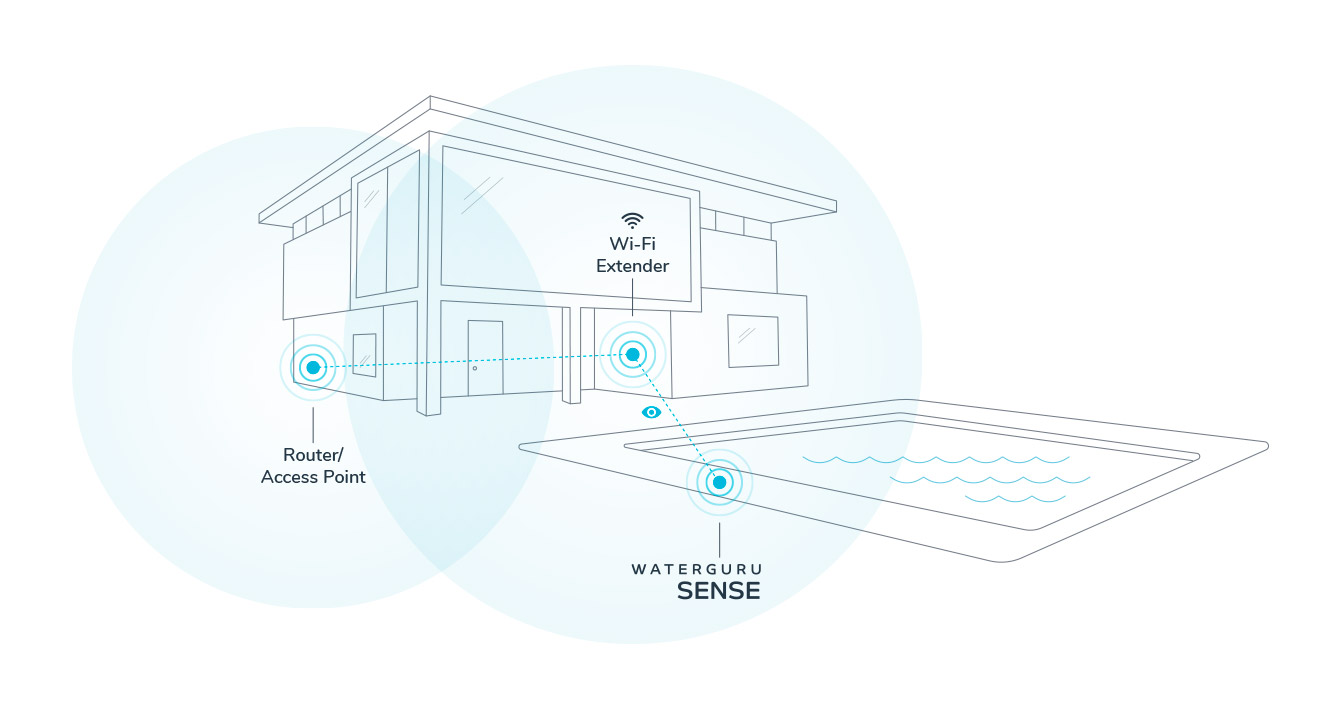
- If the SENSE can not detect Wi-Fi then you will need to setup a Wi-Fi range extender.
- Wi-Fi extender should be located higher to create a line of sight.
You can purchase WaterGuru right here on our website.
WaterGuru works just fine in salt water pools with salt levels up to 5000 ppm.
WaterGuru C size batteries last for approximately 6 months. Performance may vary based on the brand of batteries used. WaterGuru recommends using ‘Energizer’ brand batteries which we have tested extensively.
- The Battery compartment is located under the WaterGuru Skimmer cover.
- Remove SENSE from your skimmer and place it with the WaterGuru logo on the ground.
- Wipe away all the moisture with a cloth. It’s important to keep moisture out of the battery compartment to avoid corrosion.
- Open the battery compartment and remove the old batteries. Safely dispose of the batteries.
- Insert 4 new C size batteries from recommended brand and firmly close the battery compartment. (Manufacturers have varying characteristics in their batteries. Our testing has shown batteries from ‘Energizer’ brand perform the best in the environment that WaterGuru is exposed to.)
- Flashing LED lights will indicate that unit has turned on.
- Place the Sensor unit back in the skimmer with the cover on top of the skimmer.
Wi-Fi settings for your unit can be changed here in the App. Tap on the Settings icon in the upper right corner from the Pool Status home screen. The WaterGuru App uses Bluetooth (similar to connecting to your car) to communicate with your unit. You will need to be close to the unit when trying to change the Wi-Fi settings for your unit.
WaterGuru Cassettes hold strips of sensing pads that measure chemistry. You can purchase a cassette in Supplies here in the app or online.
- Remove the Sensor unit from the skimmer.
- Open the mesh bag and remove the cassette.
- Wipe the optical window clean in the Sensor unit at the bottom of the cassette well.
- Insert a new cassette in the Sensor unit all the way until it clicks.
- Tie the mesh sock around the cable such that no debris enters the Sensor unit and the cassette. Small debris such as insects, sand, soil, etc. can get in the optical path and result in incorrect readings.
- Place the Sensor unit back in the skimmer with the cover on top of the skimmer.
- Open the app and tap the pool icon at the bottom of the screen. In the “Supply Levels” row tap the right arrow and then mark that the cassette has been replaced.
WaterGuru refillable Cassettes have enough pads for taking 60 reads. With typical usage Cassettes last approximately 2 months.
No, it’s absolutely free and included in the app as a WaterGuru SENSE owner.
We don’t believe in subscription fees.
- Size: 151.6 MB
- Compatibility: Requires iOS 11.0 or later. Compatible with iPhone, iPad, and iPod touch.
- Languages: English
- Age: Rating: 4+
- Price: Free
support@waterguru.com